Free · No sign-up
Extract Audio from Video
Pull the audio track out of any video as MP3 or original-quality M4A, without sending it anywhere – no upload, no sign-up, no watermark added.
- No upload
- No sign-up
- No new watermark
- MP4, MOV, WebM, MKV, AVI
A real input to try
Start with an openly licensed sample.
Belong Waterfall video MRD by Mike Dickison, from Wikimedia Commons under CC BY 4.0. This unchanged WebM contains audible natural waterfall sound for editing, conversion or audio extraction.
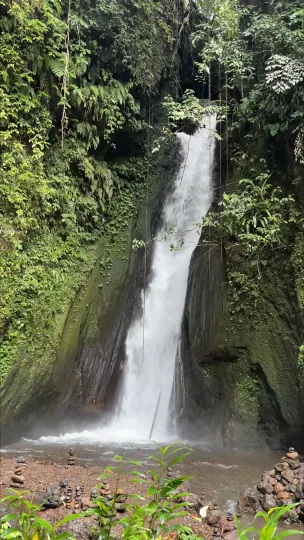
This card shows an input, not a processed result. Loading it does not upload it or start a paid task.
- Source
- Mike Dickison · CC-BY-4.0
- Input
- 608 × 1080 · 1.57 MiB
An audio extractor separates the sound from the picture. Use it to save a voice-over for re-use, get an interview into a transcription app, grab the music from a clip you recorded, or keep a lecture as an audio file.
There are two ways to save. MP3 at 128–320 kbps works on every device. Original stream copy takes the AAC (or other) audio exactly as it is stored in the video and writes it to an M4A file – no re-encoding, no quality loss, and it finishes in seconds.
Everything runs in your browser with FFmpeg WebAssembly. The video never leaves your device, no account is needed, and nothing is added to the output.
Prefer stream copy when you can
If the video holds AAC, the M4A copy is lossless and instant. Choose MP3 only for devices or apps that will not open M4A.
Bitrate by content
128 kbps is plenty for speech. Use 256–320 kbps for music. Higher numbers mean larger files, not always audible gains.
Cut to the useful part
Trim the video with the video cutter before extracting so the audio file only contains what you need.
All tools
A place for every edit.
Remove a logo, refine your footage, change a format or take the sound with you. Find the tool for your next step.
Watermark removal
Start with the part you want to remove.
- Video watermark remover
- TikTok watermark remover
- Sora watermark remover
- Veo watermark remover
- Gemini watermark remover
- Gemini image watermark remover
- Gemini image logo remover
- Nano Banana watermark remover
- Gemini video watermark remover
- Gemini logo remover
- Gemini video logo remover
- Veo logo remover
- Image watermark remover
- Remove logo from video
- Remove text from video
Edit video
Shape the frame, timing and movement.
Convert
Get the format your next step needs.
Audio
Keep the sound, without the video.

Frequently asked questions
Stream copy is lossless. MP3 re-encodes and loses a little detail; at 256–320 kbps it is hard to hear.
MP4, MOV, WebM, MKV, AVI and most files FFmpeg can decode. Output is MP3 or M4A/AAC.
Browsers handle roughly 1 GB in memory. Files under about 300 MB are comfortable; extraction is fast because the picture is not re-encoded.
Yes. No sign-up, no watermark, and the video never leaves your device.