Free · No sign-up
MP4 to MP3
Turn an MP4 into an MP3 in seconds, without sending it anywhere – no upload, no sign-up, no watermark added.
- No upload
- No sign-up
- No new watermark
- MP4, MOV, WebM, MKV, AVI
A real input to try
Start with an openly licensed sample.
Belong Waterfall video MRD by Mike Dickison, from Wikimedia Commons under CC BY 4.0. This MP4 is a local full-frame H.264/AAC transcode of the original WebM, with its natural waterfall sound. It is a test input, not this tool’s result.
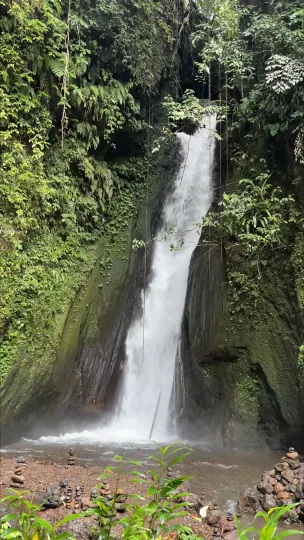
This card shows an input, not a processed result. Loading it does not upload it or start a paid task.
- Source
- Mike Dickison · CC-BY-4.0
- Input
- 608 × 1080 · 1.89 MiB
An MP4 to MP3 converter throws away the picture and keeps the sound. It is the quickest way to get a music track, a podcast episode or a recorded call out of a video file and onto a phone or into an audio editor.
Pick a bitrate between 128 and 320 kbps and click Convert. If you would rather not re-encode at all, choose the original stream copy: the AAC audio inside the MP4 is written straight to an M4A file with no quality loss.
The conversion runs in your browser with FFmpeg WebAssembly. The MP4 never leaves your device, and no account is needed.
Choose the right bitrate
128 kbps for speech, 192 kbps as a balanced default, 320 kbps for music you care about. Higher bitrates mean larger files.
Lossless option
MP4 usually contains AAC audio. Copying it to M4A is instant and keeps every bit. Only convert to MP3 if the target device needs it.
Long recordings
Audio extraction does not touch the video stream, so even a long MP4 finishes quickly. The file still has to fit in browser memory, so keep it under about 1 GB.
All tools
A place for every edit.
Remove a logo, refine your footage, change a format or take the sound with you. Find the tool for your next step.
Watermark removal
Start with the part you want to remove.
- Video watermark remover
- TikTok watermark remover
- Sora watermark remover
- Veo watermark remover
- Gemini watermark remover
- Gemini image watermark remover
- Gemini image logo remover
- Nano Banana watermark remover
- Gemini video watermark remover
- Gemini logo remover
- Gemini video logo remover
- Veo logo remover
- Image watermark remover
- Remove logo from video
- Remove text from video
Edit video
Shape the frame, timing and movement.
Convert
Get the format your next step needs.
Audio
Keep the sound, without the video.

Frequently asked questions
MP3 is lossy. At 256–320 kbps the loss is hard to hear. Use the M4A stream copy for zero loss.
Cut the MP4 to the section you want with the video cutter first, then convert that piece to MP3.
Browsers handle roughly 1 GB in memory. Files under about 300 MB are comfortable.
Yes. No sign-up, no watermark, and nothing is sent to a server.